Apache Gravitino Trino connector development
This document guides you through developing the Apache Gravitino Trino connector locally.
Multi-version architecture
The Gravitino Trino connector supports multiple Trino versions (see Requirements). The source code is organized into a shared base module and several version-segment modules:
trino-connector/
├── trino-connector/              # Shared base source code
│   └── src/main/java/            # Common implementation used by all versions
├── trino-connector-435-439/      # Version-specific adapters for Trino 435-439
│   └── src/main/java/
├── trino-connector-440-445/      # Version-specific adapters for Trino 440-445
│   └── src/main/java/
├── trino-connector-446-451/      # Version-specific adapters for Trino 446-451
│   └── src/main/java/
├── trino-connector-452-468/      # Version-specific adapters for Trino 452-468
│   └── src/main/java/
├── trino-connector-469-472/      # Version-specific adapters for Trino 469-472
│   └── src/main/java/
├── trino-connector-473-478/      # Version-specific adapters for Trino 473-478
│   └── src/main/java/
└── integration-test/             # Integration tests
Each version-segment module includes the shared base source via Gradle sourceSets and adds version-specific adapter classes (e.g., GravitinoConnector469.java, GravitinoPlugin469.java) to handle Trino SPI differences across versions.
When developing against a specific Trino version in the Trino project, you need to include both the shared base source and the matching version-segment source as source directories in the Maven pom.xml.
Prerequisites
Before you start, ensure the following:
- Start the Gravitino server locally. For more information, refer to How to install.
- Create a catalog in the Gravitino server. For more information, refer to Gravitino metadata management. For example, create a MySQL catalog:
curl -X POST -H "Content-Type: application/json" -d '{"name":"test","comment":"comment","properties":{}}' http://localhost:8090/api/metalakes

curl -X POST -H "Content-Type: application/json" -d '{"name":"mysql_catalog3","type":"RELATIONAL","comment":"comment","provider":"jdbc-mysql", "properties":{
  "jdbc-url": "jdbc:mysql://127.0.0.1:3306?useSSL=false&allowPublicKeyRetrieval=true",
  "jdbc-user": "root",
  "jdbc-password": "123456",
  "jdbc-driver": "com.mysql.cj.jdbc.Driver"
}}' http://localhost:8090/api/metalakes/test/catalogs
Change localhost, port, and the names of metalake and catalogs to match your environment.
Development environment
IDEA
-
Clone the Trino repository from GitHub. This document uses Trino
469by default. Check out the tag matching your target Trino version (e.g.,git checkout 469). -
Open the Trino project in IDEA.
-
Create a new module named
trino-gravitinoin the Trino project as shown below: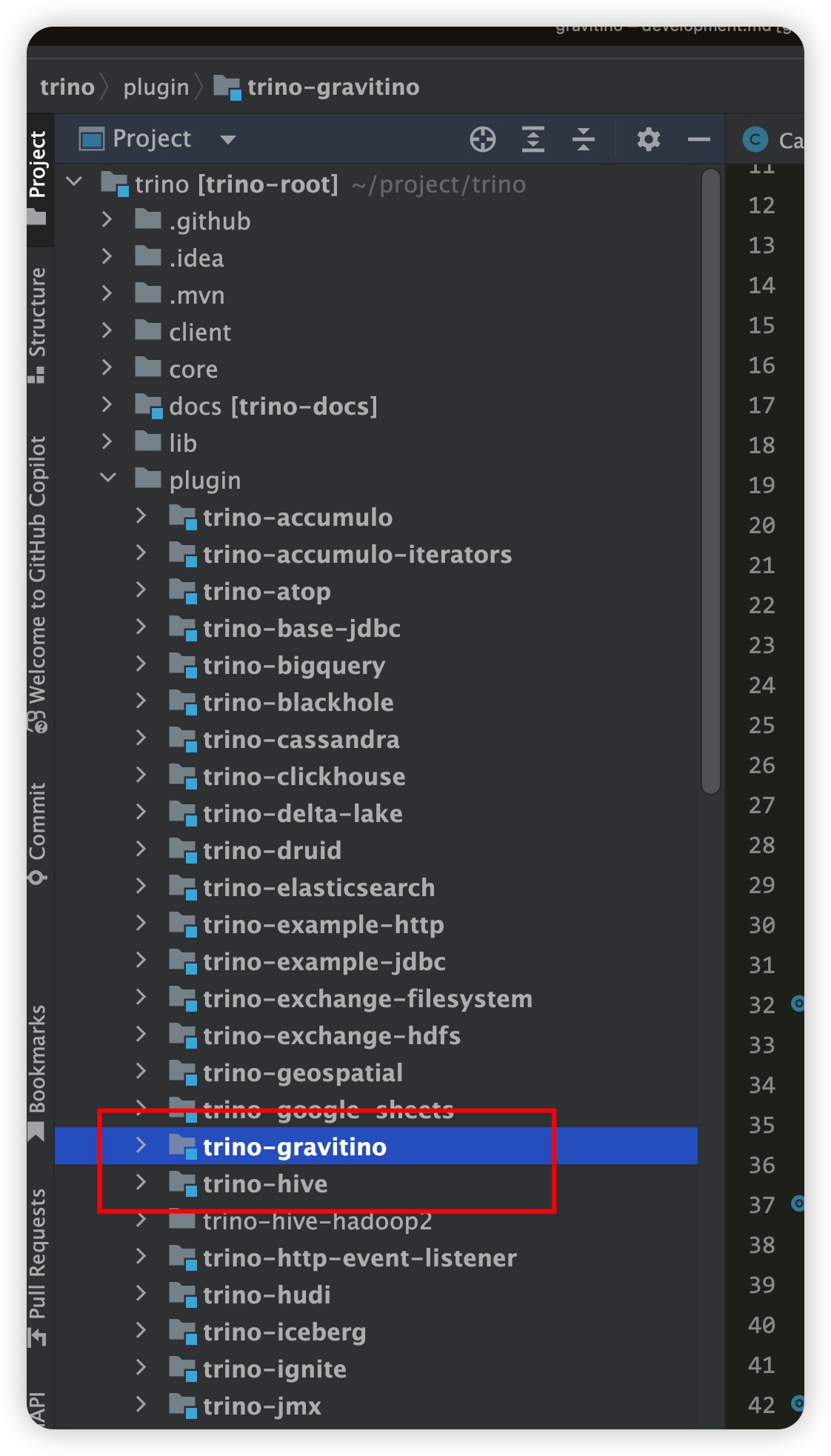
-
Identify which version-segment module matches your Trino version:
Trino Version Version-Segment Module 435-439 trino-connector-435-439440-445 trino-connector-440-445446-451 trino-connector-446-451452-468 trino-connector-452-468469-472 trino-connector-469-472473-478 trino-connector-473-478 -
Add
<module>plugin/trino-gravitino</module>totrino/pom.xmland create thepom.xmlfor thetrino-gravitinomodule. The example below uses Trino469. Ensure thetrino-rootversion matches the Trino version you are developing against.The
<build>section usesbuild-helper-maven-pluginto add the Gravitino source directories directly. Replace/path/to/gravitinowith the absolute path of your local Gravitino project root, and changetrino-connector-469-472to the version-segment module from step 4.
<?xml version="1.0" encoding="UTF-8"?>
<project xmlns="http://maven.apache.org/POM/4.0.0" xmlns:xsi="http://www.w3.org/2001/XMLSchema-instance" xsi:schemaLocation="http://maven.apache.org/POM/4.0.0 http://maven.apache.org/xsd/maven-4.0.0.xsd">
    <modelVersion>4.0.0</modelVersion>
    <parent>
        <groupId>io.trino</groupId>
        <artifactId>trino-root</artifactId>
        <version>469</version>
        <relativePath>../../pom.xml</relativePath>
    </parent>

    <artifactId>trino-gravitino</artifactId>
    <packaging>trino-plugin</packaging>
    <description>Trino - Gravitino Connector</description>

    <properties>
        <air.main.basedir>${project.parent.basedir}</air.main.basedir>
    </properties>

    <dependencies>

        <!--
            You can use the snapshot version. For example, to use the jar from
            the latest main branch, run the following command in the Gravitino project:
            ./gradlew publishToMavenLocal
        -->
        <dependency>
            <groupId>org.apache.gravitino</groupId>
            <artifactId>catalog-common</artifactId>
            <version><GRAVITINO_VERSION></version>
            <exclusions>
                <exclusion>
                    <groupId>io.dropwizard.metrics</groupId>
                    <artifactId>metrics-core</artifactId>
                </exclusion>
                <exclusion>
                    <groupId>io.netty</groupId>
                    <artifactId>netty</artifactId>
                </exclusion>
                <exclusion>
                    <groupId>org.apache.logging.log4j</groupId>
                    <artifactId>log4j-core</artifactId>
                </exclusion>
            </exclusions>
        </dependency>

        <dependency>
            <groupId>org.apache.gravitino</groupId>
            <artifactId>client-java-runtime</artifactId>
            <version><GRAVITINO_VERSION></version>
        </dependency>

        <dependency>
            <groupId>io.airlift</groupId>
            <artifactId>json</artifactId>
        </dependency>

        <dependency>
            <groupId>io.airlift.resolver</groupId>
            <artifactId>resolver</artifactId>
            <version>1.6</version>
        </dependency>

        <dependency>
            <groupId>io.trino</groupId>
            <artifactId>trino-client</artifactId>
        </dependency>

        <dependency>
            <groupId>io.trino</groupId>
            <artifactId>trino-jdbc</artifactId>
        </dependency>

        <dependency>
            <groupId>joda-time</groupId>
            <artifactId>joda-time</artifactId>
        </dependency>

        <dependency>
            <groupId>org.apache.commons</groupId>
            <artifactId>commons-collections4</artifactId>
            <version>4.4</version>
        </dependency>

        <dependency>
            <groupId>org.apache.commons</groupId>
            <artifactId>commons-lang3</artifactId>
        </dependency>

        <dependency>
            <groupId>org.codehaus.plexus</groupId>
            <artifactId>plexus-xml</artifactId>
            <version>4.0.2</version>
        </dependency>

        <dependency>
            <groupId>org.slf4j</groupId>
            <artifactId>slf4j-api</artifactId>
            <version>2.0.9</version>
        </dependency>

        <dependency>
            <groupId>org.apache.logging.log4j</groupId>
            <artifactId>log4j-slf4j2-impl</artifactId>
            <version>2.22.0</version>
        </dependency>

        <dependency>
            <groupId>org.apache.logging.log4j</groupId>
            <artifactId>log4j-api</artifactId>
            <version>2.22.0</version>
        </dependency>

        <dependency>
            <groupId>org.apache.logging.log4j</groupId>
            <artifactId>log4j-core</artifactId>
            <version>2.22.0</version>
        </dependency>

        <dependency>
            <groupId>com.fasterxml.jackson.core</groupId>
            <artifactId>jackson-annotations</artifactId>
            <scope>provided</scope>
        </dependency>

        <dependency>
            <groupId>io.opentelemetry</groupId>
            <artifactId>opentelemetry-api</artifactId>
            <scope>provided</scope>
        </dependency>

        <dependency>
            <groupId>io.trino</groupId>
            <artifactId>trino-spi</artifactId>
            <scope>provided</scope>
        </dependency>

    </dependencies>

    <build>
        <plugins>
            <plugin>
                <groupId>org.codehaus.mojo</groupId>
                <artifactId>build-helper-maven-plugin</artifactId>
                <executions>
                    <execution>
                        <id>add-source</id>
                        <phase>generate-sources</phase>
                        <goals>
                            <goal>add-source</goal>
                        </goals>
                        <configuration>
                            <sources>
                                <!-- Shared base source -->
                                <source>/path/to/gravitino/trino-connector/trino-connector/src/main/java</source>
                                <!-- Version-segment source (change to match your Trino version) -->
                                <source>/path/to/gravitino/trino-connector/trino-connector-469-472/src/main/java</source>
                            </sources>
                        </configuration>
                    </execution>
                </executions>
            </plugin>
        </plugins>
    </build>

</project>
- Try to compile the
trino-gravitinomodule to check for errors:
# Build the whole Trino project
./mvnw -pl '!core/trino-server-rpm' package -DskipTests -Dair.check.skip-all=true

# Build only the trino-gravitino module
./mvnw clean -pl 'plugin/trino-gravitino' package -DskipTests -Dair.check.skip-all=true
If a compile error occurs due to The following artifacts could not be resolved: org.apache.gravitino:xxx:jar, run ./gradlew publishToMavenLocal in the Gravitino project first.
-
Set up the configuration for the Gravitino Trino connector in the Trino project as shown below:
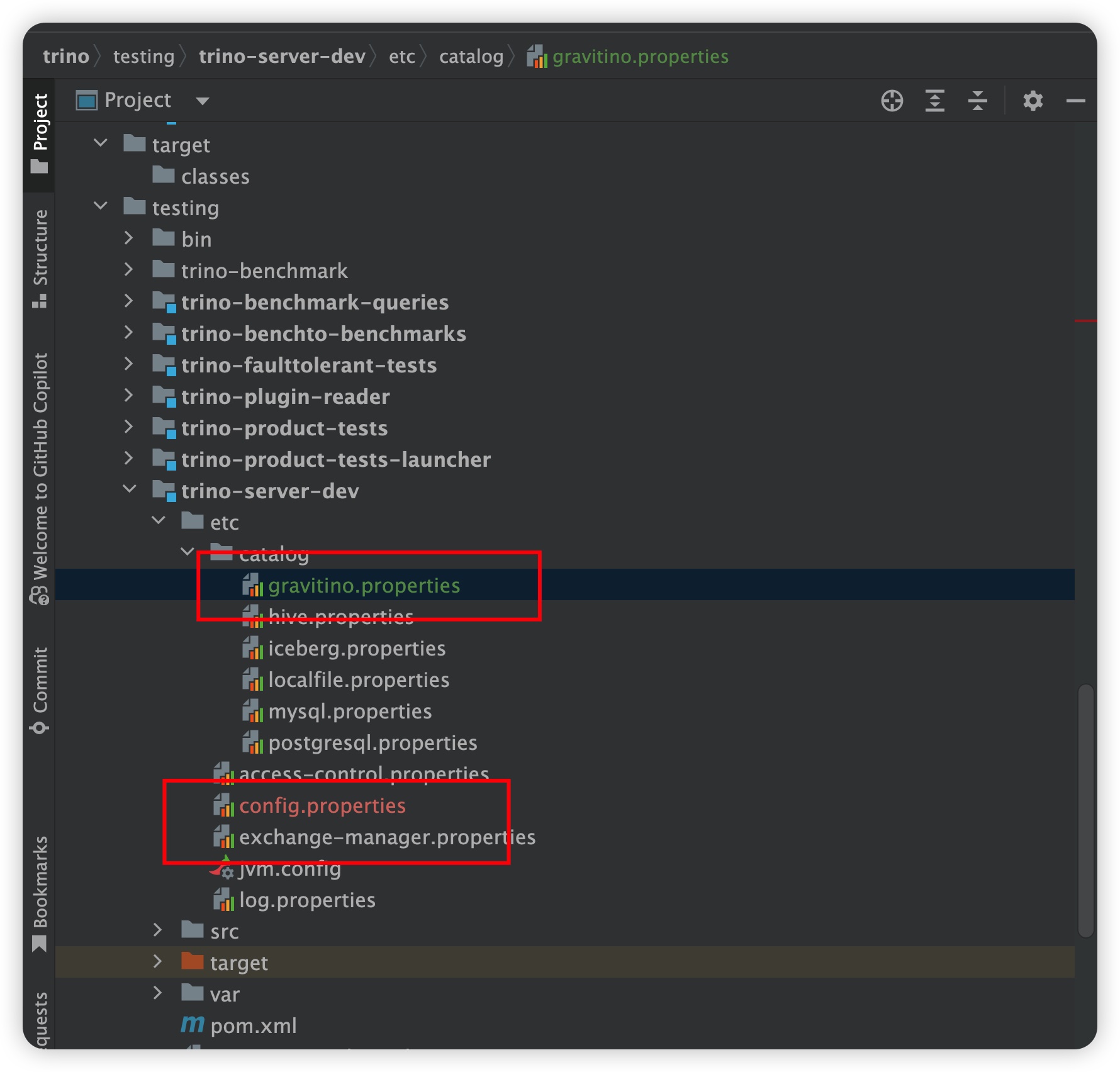
The corresponding configuration files:
- Gravitino properties file:
gravitino.properties
connector.name=gravitino
gravitino.uri=http://localhost:8090
gravitino.metalake=test- Trino configuration file:
config.properties
#
# WARNING
# ^^^^^^^
# This configuration file is for development only and should NOT be used
# in production. For example configuration, see the Trino documentation.
#
node.id=ffffffff-ffff-ffff-ffff-ffffffffffff
node.environment=test
node.internal-address=localhost
experimental.concurrent-startup=true

# Default port is 8080, change it to 8180 to avoid conflicts
http-server.http.port=8180

discovery.uri=http://localhost:8180

exchange.http-client.max-connections=1000
exchange.http-client.max-connections-per-server=1000
exchange.http-client.connect-timeout=1m
exchange.http-client.idle-timeout=1m

scheduler.http-client.max-connections=1000
scheduler.http-client.max-connections-per-server=1000
scheduler.http-client.connect-timeout=1m
scheduler.http-client.idle-timeout=1m

query.client.timeout=5m
query.min-expire-age=30m

plugin.bundles=\
  ../../plugin/trino-iceberg/pom.xml,\
  ../../plugin/trino-hive/pom.xml,\
  ../../plugin/trino-local-file/pom.xml,\
  ../../plugin/trino-mysql/pom.xml,\
  ../../plugin/trino-postgresql/pom.xml,\
  ../../plugin/trino-exchange-filesystem/pom.xml,\
  ../../plugin/trino-gravitino/pom.xml

node-scheduler.include-coordinator=true

# The Gravitino Trino connector only supports the dynamic catalog manager
catalog.management=dynamicnoteRemove
/etc/catalogs/xxx.propertiesif the correspondingplugin/trino-xxx/pom.xmlis not listed inplugin.bundles. For the Hive plugin, useplugin/trino-hive/pom.xmlfor Trino 435 and later; for earlier versions, useplugin/trino-hive-hadoop2/pom.xml. - Gravitino properties file:
-
Start the Trino server and connect to the Gravitino server.

-
Once
DevelopmentServerstarts successfully, connect to the Trino server using the Trino CLI:java -jar trino-cli-*-executable.jar --server localhost:8180noteDownload the
trino-clijar from the Trino release page. Use the CLI version that matches your Trino server version. -
You can now develop the Gravitino Trino connector in the Gravitino project and debug it in the Trino project.
