Fileset Catalog
Introduction
The fileset catalog manages the storage location of a fileset through a Hadoop Compatible File System (HCFS). It supports the local filesystem and HDFS out of the box, and Amazon S3, Google Cloud Storage, Azure Data Lake Storage, Alibaba Cloud OSS and Tencent Cloud COS once the matching bundle jar is on the classpath.
This page is the shared reference: the properties every backend accepts, how they are inherited from catalog to schema to fileset, and how to plug in a custom filesystem. It uses HDFS and the local filesystem in its examples. For a runnable end-to-end example on a cloud backend, follow the page for that backend listed under Fileset Catalog with Cloud Storage.
Note that Gravitino uses Hadoop 3 dependencies to build Fileset catalog. Theoretically, it should be compatible with both Hadoop 2.x and 3.x, since Gravitino doesn't leverage any new features in Hadoop 3. If there's any compatibility issue, create an issue.
Catalog
Catalog Properties
Besides the common catalog properties, the Fileset catalog has the following properties:
| Property Name | Description | Default Value | Required |
|---|---|---|---|
location | The storage location managed by Fileset catalog. Its location name is unknown. The value should always a directory(HDFS) or path prefix(cloud storage like S3, GCS.) and does not support a single file. | (none) | No |
location- | The property prefix. User can use location-{name}={path} to set multiple locations with different names for the catalog. | (none) | No |
default-filesystem-provider | (deprecated) The default filesystem provider of this Fileset catalog if users do not specify the scheme in the URI. Candidate values are 'builtin-local', 'builtin-hdfs', 's3', 'gcs', 'abs' and 'oss'. Default value is builtin-local. For S3, if we set this value to 's3', we can omit the prefix 's3a://' in the location. | builtin-local | No |
filesystem-providers | (deprecated) The file system providers to add. Users need to set this configuration to support cloud storage or custom HCFS. For instance, set it to s3 or a comma separated string that contains s3 like gs,s3 to support multiple kinds of fileset including s3. | (none) | NO |
credential-providers | The credential provider types, separated by comma. | (none) | No |
filesystem-conn-timeout-secs | The timeout of getting the file system using Hadoop FileSystem client instance. Time unit: seconds. | 6 | No |
disable-filesystem-ops | The configuration to disable file system operations in the server side. If set to true, the Fileset catalog in the server side will not create, drop files or folder when the schema, fileset is created, dropped. | false | No |
fileset-cache-eviction-interval-ms | The interval in milliseconds to evict the fileset cache, -1 means never evict. | 3600000 | No |
fileset-cache-max-size | The maximum number of the filesets the cache may contain, -1 means no limit. | 200000 | No |
config.resources | The configuration resources, separated by comma. For example, hdfs-site.xml,core-site.xml. | (none) | No |
fs.path.config.<name> | Defines a logical location entry. Set fs.path.config.<name> to the real base URI (for example, hdfs://cluster1/). Any key that starts with the same prefix (such as fs.path.config.<name>.config.resource) is treated as a location-scoped property and will be forwarded to the underlying filesystem client. | (none) | No |
default-filesystem-provider and filesystem-providers are deprecated. The fileset catalog automatically loads filesystem providers on the classpath, including the built-in filesystem provider and cloud providers when the corresponding bundle jar is present (for example, gravitino-aws-bundle, gravitino-azure-bundle, gravitino-aliyun-bundle, or gravitino-gcp-bundle).
Refer to Credential vending for more details about credential vending.
HDFS Fileset
Apart from the above properties, to access fileset like HDFS fileset, you need to configure the following extra properties.
| Property Name | Description | Default Value | Required |
|---|---|---|---|
authentication.impersonation-enable | Whether to enable impersonation for the Fileset catalog. | false | No |
authentication.type | The type of authentication for Fileset catalog, we only support kerberos, simple. | simple | No |
authentication.kerberos.principal | The principal of the Kerberos authentication | (none) | required if the value of authentication.type is Kerberos. |
authentication.kerberos.keytab-uri | The URI of The keytab for the Kerberos authentication. | (none) | required if the value of authentication.type is Kerberos. |
authentication.kerberos.check-interval-sec | The check interval of Kerberos credential for Fileset catalog. | 60 | No |
authentication.kerberos.keytab-fetch-timeout-sec | The fetch timeout of retrieving Kerberos keytab from authentication.kerberos.keytab-uri. | 60 | No |
The config.resources property allows users to specify custom configuration files.
The Gravitino Fileset extends the following properties in the xxx-site.xml:
| Property Name | Description | Default Value | Required |
|---|---|---|---|
| hadoop.security.authentication.kerberos.principal | The principal of the Kerberos authentication for HDFS client. | (none) | required if the value of authentication.type is Kerberos. |
| hadoop.security.authentication.kerberos.keytab | The keytab file path of the Kerberos authentication for HDFS client. | (none) | required if the value of authentication.type is Kerberos. |
| hadoop.security.authentication.kerberos.krb5.conf | The krb5.conf file path of the Kerberos authentication for HDFS client. | (none) | No |
Fileset Catalog with Cloud Storage
For Java and Hadoop-based access, Fileset uses the Hadoop Compatible File System (HCFS) interface.
Each cloud backend provides its own Hadoop FileSystem implementation, such as S3A for Amazon S3.
Put the matching bundle jar on the classpath and set the credential properties for that backend.
Python clients use fsspec-based implementations and do not require these jars. Each backend has its
own page with a runnable end-to-end example.
| Storage backend | Bundle jar | Location scheme | Backend properties |
|---|---|---|---|
| Amazon S3 | gravitino-aws-bundle | s3a:// | s3-endpoint, s3-access-key-id, s3-secret-access-key |
| Google Cloud Storage | gravitino-gcp-bundle | gs:// | gcs-service-account-file |
| Azure Data Lake Storage | gravitino-azure-bundle | abfss:// | azure-storage-account-name, azure-storage-account-key |
| Alibaba Cloud OSS | gravitino-aliyun-bundle | oss:// | oss-endpoint, oss-access-key-id, oss-secret-access-key |
| Tencent Cloud COS | gravitino-tencent-bundle | cosn:// | cos-region, cos-access-key-id, cos-secret-access-key, cos-endpoint |
A catalog may hold locations in more than one backend at the same time, as long as every bundle jar
involved is on the classpath. Cloud backends also accept config.resources to pass custom
configuration files to the underlying filesystem client.
Implement a Custom HCFS File System Fileset
Developers and users can custom their own HCFS file system fileset by implementing theFileSystemProvider interface in
the jar gravitino-hadoop-common. The
FileSystemProvider interface is defined as follows:
  // Create a FileSystem instance by the properties you have set when creating the catalog.
  FileSystem getFileSystem(@Nonnull Path path, @Nonnull Map<String, String> config)
      throws IOException;

  // The schema name of the file system provider. 'file' for Local file system,
  // 'hdfs' for HDFS, 's3a' for AWS S3, 'gs' for GCS, 'oss' for Aliyun OSS.
  String scheme();

  // Name of the file system provider. 'builtin-local' for Local file system, 'builtin-hdfs' for HDFS,
  // 's3' for AWS S3, 'gcs' for GCS, 'oss' for Aliyun OSS.
  String name();
In the meantime, FileSystemProvider uses Java SPI to load the custom file system provider. You
need to create a file named org.apache.gravitino.catalog.hadoop.fs.FileSystemProvider in the
META-INF/services directory of the jar file. The content of the file is the full class name of
the custom file system provider. For example, the content of S3FileSystemProvider is as follows:
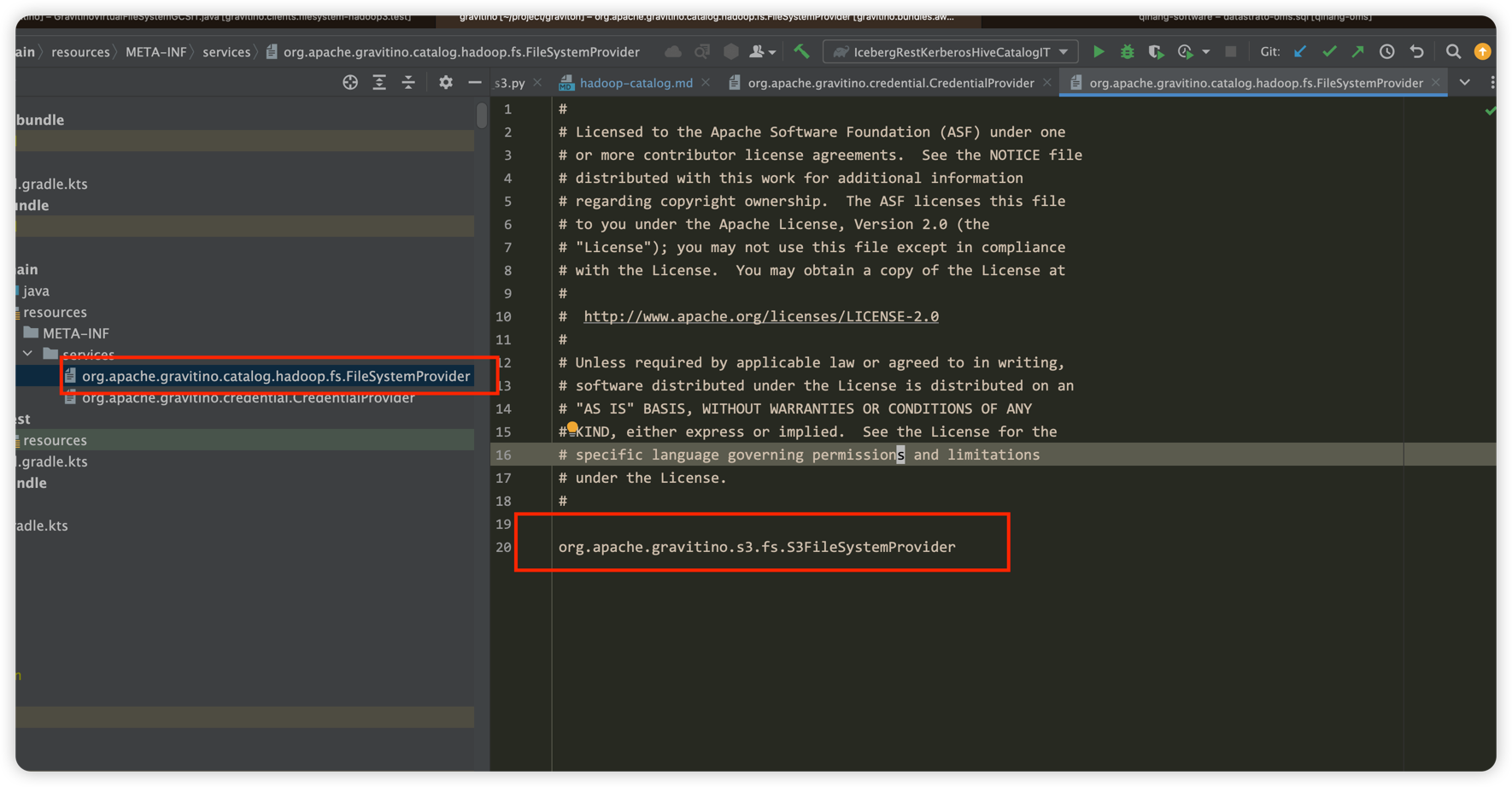
After implementing the FileSystemProvider interface, you need to put the jar file into the
$GRAVITINO_HOME/catalogs/fileset/libs directory. Then you can use your custom file system provider.
Fileset Catalog Authentication
The Fileset catalog supports multi-level authentication to control access, allowing different authentication settings for the catalog, schema, and fileset. The priority of authentication settings is as follows: catalog < schema < fileset. Specifically:
- Catalog: The default authentication is
simple. - Schema: Inherits the authentication setting from the catalog if not explicitly set. For more information about schema settings, refer to Schema properties.
- Fileset: Inherits the authentication setting from the schema if not explicitly set. For more information about fileset settings, refer to Fileset properties.
The default value of authentication.impersonation-enable is false, and the default value for catalogs about this
configuration is false, for
schemas and filesets, the default value is inherited from the parent. Value set by the user will override the parent
value, and the priority mechanism is the same as authentication.
Catalog Operations
Refer to Catalog operations for more details.
Schema
Schema Capabilities
The Fileset catalog supports creating, updating, deleting, and listing schema.
Schema Properties
All the catalog properties are inherited by the schema. Besides, the Fileset catalog schema has the following properties:
| Property name | Description | Default value | Required |
|---|---|---|---|
location | The storage location managed by schema. Its location name is unknown. It's also should be a directory or path prefix. | (none) | No |
location- | The property prefix. User can use location-{name}={path} to set multiple locations with different names for the schema. | (none) | No |
authentication.impersonation-enable | Whether to enable impersonation for this schema of the Fileset catalog. | The parent(catalog) value | No |
authentication.type | The type of authentication for this schema of Fileset catalog , we only support kerberos, simple. | The parent(catalog) value | No |
authentication.kerberos.principal | The principal of the Kerberos authentication for this schema. | The parent(catalog) value | No |
authentication.kerberos.keytab-uri | The URI of The keytab for the Kerberos authentication for this schema. | The parent(catalog) value | No |
credential-providers | The credential provider types, separated by comma. | (none) | No |
config.resources | The configuration resources, separated by comma. For example, hdfs-site.xml,core-site.xml. | (none) | No |
Schema Operations
Refer to Schema operations for more details.
During schema creation or deletion, Gravitino automatically creates or removes the corresponding filesystem directories for the schema locations. This behavior is skipped in either of these cases:
- When the catalog property
disable-filesystem-opsis set totrue - When the location contains placeholders
Fileset
Fileset Capabilities
- The Fileset catalog supports creating, updating, deleting, and listing filesets.
Fileset Properties
All the schema properties are inherited by the fileset. include the properties inherited from the catalog. Besides, the Fileset catalog fileset has the following properties:
| Property name | Description | Default value | Required | Immutable |
|---|---|---|---|---|
location | The storage location managed by schema. Its location name is unknown. It's also should be a directory or path prefix. | (none) | No | Yes |
authentication.impersonation-enable | Whether to enable impersonation for the Fileset catalog fileset. | The parent(schema) value | No | Yes |
authentication.type | The type of authentication for Fileset catalog fileset, we only support kerberos, simple. | The parent(schema) value | No | No |
authentication.kerberos.principal | The principal of the Kerberos authentication for the fileset. | The parent(schema) value | No | No |
authentication.kerberos.keytab-uri | The URI of The keytab for the Kerberos authentication for the fileset. | The parent(schema) value | No | No |
credential-providers | The credential provider types, separated by comma. | (none) | No | No |
placeholder- | Properties that start with placeholder- are used to replace placeholders in the location. | (none) | No | Yes |
default-location-name | The name of the default location of the fileset, mainly used for GVFS operations without specifying a location name. | When the fileset has only one location, its location name will be automatically selected as the default value. | Yes, if the fileset has multiple locations | Yes |
config.resources | The configuration resources, separated by comma. For example, hdfs-site.xml,core-site.xml. | (none) | No | NO |
Some properties are reserved and cannot be set by users:
| Property name | Description | Default value |
|---|---|---|
placeholder-catalog | The placeholder for the catalog name. | catalog name of the fileset |
placeholder-schema | The placeholder for the schema name. | schema name of the fileset |
placeholder-fileset | The placeholder for the fileset name. | fileset name |
Credential providers can be specified in several places, as listed below. Gravitino checks the credential-providers
setting in the following order of precedence:
- Fileset properties
- Schema properties
- Catalog properties
Fileset Operations
Refer to Fileset operations for more details.