Table Maintenance Service (Optimizer)
What is this service
The Table Maintenance Service (Optimizer) automates table maintenance by connecting:
- Statistics and metrics collection
- Rule evaluation and strategy recommendation
- Job template based execution
The CLI commands and configuration keys use the optimizer name.
Alpha status and current limitations
The current Table Maintenance Service is in alpha stage.
Current limitations:
- It is operated through the optimizer CLI workflow.
- The built-in maintenance strategy focuses on Iceberg table compaction.
- Compaction support is currently limited to Iceberg tables with identity partition transforms.
Extensibility and roadmap
Although the built-in capability is intentionally narrow in alpha, the framework is designed for extension:
- Integrate external systems by implementing custom providers and adapters.
- Add new strategies and handlers beyond built-in compaction.
- Plug in custom metrics, evaluators, and job submitters for different environments.
See Optimizer Extension Guide for extension points.
Future versions will continue improving the out-of-the-box experience and evolve toward a more ready-to-use maintenance service.
Architecture overview
The optimizer workflow is based on six parts:
- Metadata objects: catalog/schema/table in a metalake.
- Statistics and metrics: table/partition signals used for decision making.
- Policies: strategy intent, for example
system_iceberg_compaction. - Job templates: executable contracts, for example built-in Spark templates.
- Job executor: local or custom backend that runs submitted jobs.
- Status and logs: REST job state plus local staging logs.
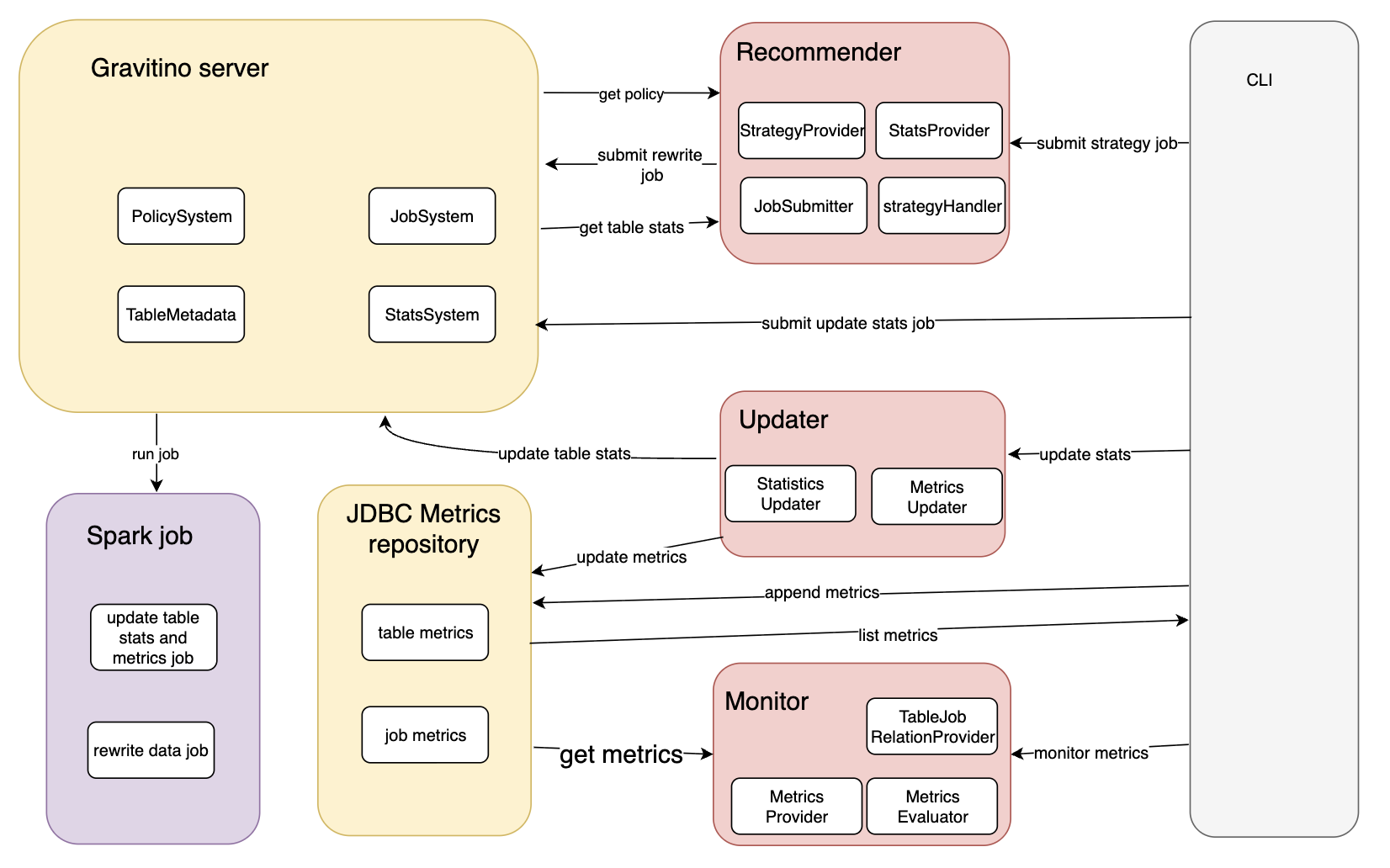
The following diagram shows the end-to-end interactions between CLI, Gravitino server, Spark jobs, JDBC metrics repository, and the Recommender/Updater/Monitor modules.
Typical data flow:
- Collect statistics and metrics for target tables.
- Evaluate rules and produce candidate actions.
- Submit jobs using a concrete template and
jobConf. - Track status and verify results on table metadata and logs.
Execution modes
| Mode | Main entry | Best for | Output |
|---|---|---|---|
| Built-in maintenance workflow | Gravitino REST + built-in templates | Server-side operational runs | Submitted Spark jobs and updated metadata |
| Optimizer CLI local calculator | gravitino-optimizer.sh | Local file-driven testing and batch scripts | Statistics/metrics updates and optional submissions |
Use built-in maintenance workflow when you want policy-driven server execution. Use CLI local calculator when you want to feed JSONL input directly.
Start here
- Configuration first: read Optimizer Configuration.
- Need custom integrations: read Optimizer Extension Guide.
- First-time enablement: run Optimizer Quick Start and Verification.
- CLI-only usage: read Optimizer CLI Reference.
- Runtime failures or mismatched results: check Optimizer Troubleshooting.
Lifecycle
1. Collect
Generate or ingest table and partition statistics/metrics.
2. Evaluate
Apply policies and rules to decide whether maintenance should run.
3. Submit
Pick a job template and submit job with concrete jobConf.
4. Observe
Check REST job status and validate resulting statistics, metrics, or rewritten data files.
Configuration model
| Layer | Scope | Typical keys |
|---|---|---|
| Gravitino server config | Runtime for job manager and executor | gravitino.job.executor, gravitino.job.statusPullIntervalInMs, gravitino.jobExecutor.local.sparkHome |
Job submission jobConf | Per job run | catalog_name, table_identifier, spark_*, template-specific args |
| Optimizer CLI config | CLI commands | gravitino.optimizer.* in conf/gravitino-optimizer.conf |
Terminology mapping
| Term | Example value | Used in |
|---|---|---|
| Policy name | iceberg_compaction_default | Policy identity and CLI --strategy-name |
| Policy type | system_iceberg_compaction | REST policy creation field policyType |
| Strategy type | iceberg-data-compaction | Policy content field strategy.type and strategy handler config key |
For strategy submission, --strategy-name must use policy name, not policy type or strategy type.
Prerequisites and verification
Quick start prerequisites and success checks are documented in Optimizer Quick Start and Verification.