Access Control
Overview
Apache Gravitino provides unified access control across multiple data sources, enabling you to manage permissions from a single interface regardless of whether your data resides in databases, message queues, or object storage systems.
The Challenge
Managing access control across heterogeneous data sources presents significant challenges:
- Each data source has its own access control system with unique permissions models
- Querying multiple data sources simultaneously requires managing multiple authorization systems
- Data governance practitioners must ensure compliance across diverse systems
The Solution
Gravitino addresses these challenges by implementing a universal privilege model that:
- Unifies access control: Manage all data source permissions through a single interface
- Supports multiple engines: Works seamlessly with Spark, Trino, Flink, and Python clients
- Simplifies governance: Enforce consistent access policies across all data sources
- Reduces complexity: Eliminate the need to manage individual access control systems
Gravitino Privilege Model
Gravitino provides a unified authorization model that works across all connected data sources while respecting each source's unique characteristics.
Architecture:
When users or data engines access data through Gravitino, the privilege model:
- Evaluates permissions at the Gravitino layer first
- Translates Gravitino privileges to data source-specific permissions when needed
- Maintains consistency across different data sources while preventing permission conflicts
Access Control Models:
Gravitino adopts two complementary access control models:
- Role-Based Access Control (RBAC): Access privileges are assigned to roles, which are in turn assigned to users or groups
- Discretionary Access Control (DAC): Each metadata object has an owner who can grant access to that object
Gravitino only supports authorization for securable objects, when Gravitino supports to pass the privileges to underlying authorization plugin. Gravitino doesn't support metadata authentication. It means that Gravitino won't check the privileges when Gravitino receives the requests.
Core Concepts
Authorization
Gravitino provides two types of authorization mechanisms:
Built-in Authorization
Gravitino includes built-in metadata authorization that you can enable with the following configuration:
gravitino.authorization.enable = true
To disable built-in authorization and pass through all requests without authorization checks:
gravitino.authorization.impl = org.apache.gravitino.server.authorization.PassThroughAuthorizer
Prerequisites for Built-in Authorization:
- Authorization must be enabled
- Users must be granted appropriate privileges
- See API Required Conditions for privilege requirements for each REST API
Authorization Pushdown
In addition to built-in authorization, Gravitino can push down authorization to underlying data sources. This allows integration with:
- Data source native access control (e.g., MySQL privileges)
- Enterprise authorization systems (e.g., Apache Ranger)
The pushdown mechanism translates Gravitino's authorization model to data source-specific permissions while maintaining consistency.
For more information, see Authorization Pushdown.
Authentication
Gravitino uses a combined approach for access control:
- Ownership: Controls management operations (create, drop, alter) on securable objects
- Roles: Controls access to securable objects (read, write, use)
When a user performs an operation on a resource, Gravitino evaluates both ownership and role-based permissions. If a user has multiple roles, Gravitino evaluates all of them to determine the final permission set.
Role
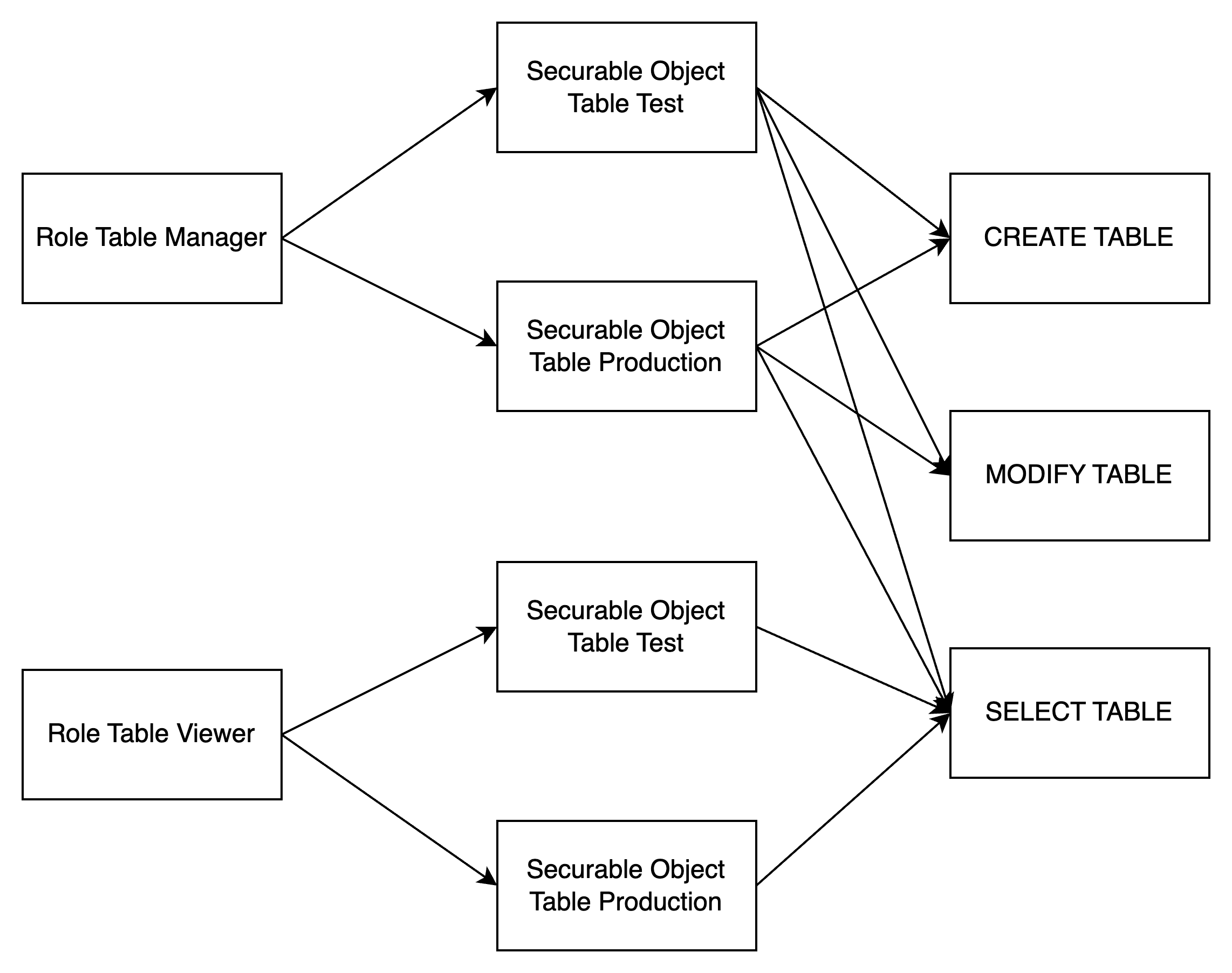
A role is a named collection of privileges on securable objects. Roles simplify access management by allowing you to:
- Group privileges: Bundle related permissions together
- Assign to multiple users: Grant the same set of permissions to multiple users or groups
- Quick onboarding: New users can start working immediately by receiving pre-configured roles
Ownership of Roles:
- The creator of a role is automatically the owner
- Owners have full control over the role, including the ability to drop it
- Only the owner can modify the role's permissions
Privilege
Privilege is a specific operation method for securable object, if you need to control fine-grained privileges on a securable object in the system, then you need to design many different Privileges, however, too many Privileges will cause too complicated settings in the authorization.
If you only need to carry out coarse-grained privilege control on the securable object in the system, then you only need to design a small number of Privileges,
but it will result in too weak control ability when the authentication. Therefore, the design of Privilege is an important trade-off in the access control system.
We know that Privilege is generally divided into two types, one is the management category of Privilege, such as the CREATE, DELETE resource privilege,
and the other is the operation category of Privilege, such as the READ and WRITE resource privilege.
In most organizations, the number of data managers is much smaller than the number of data users. Because it is the data users who need fine-grained privilege control, we must provide more Privileges related to usage and more tightly gatekeeper the administrative Privileges. To enforce this, we’ll introduce the concept of Ownership as a complete replacement for the administrative category of Privilege.
Ownership
Every securable object in Gravitino has an owner - the user with administrative control over that object.
Key Characteristics:
- Automatic assignment: The creator of an object automatically becomes its owner
- Administrative privileges: Owners have implicit management privileges (e.g., drop, alter)
- Exclusive control: Only the owner can fully manage the object
Group ownership is not currently supported. Only user ownership is available.
Supported Objects:
The following metadata objects support ownership:
| Metadata Object Type |
|---|
| Metalake |
| Catalog |
| Schema |
| Table |
| Topic |
| Fileset |
| Role |
| Model |
| Tag |
| JobTemplate |
| Job |
User
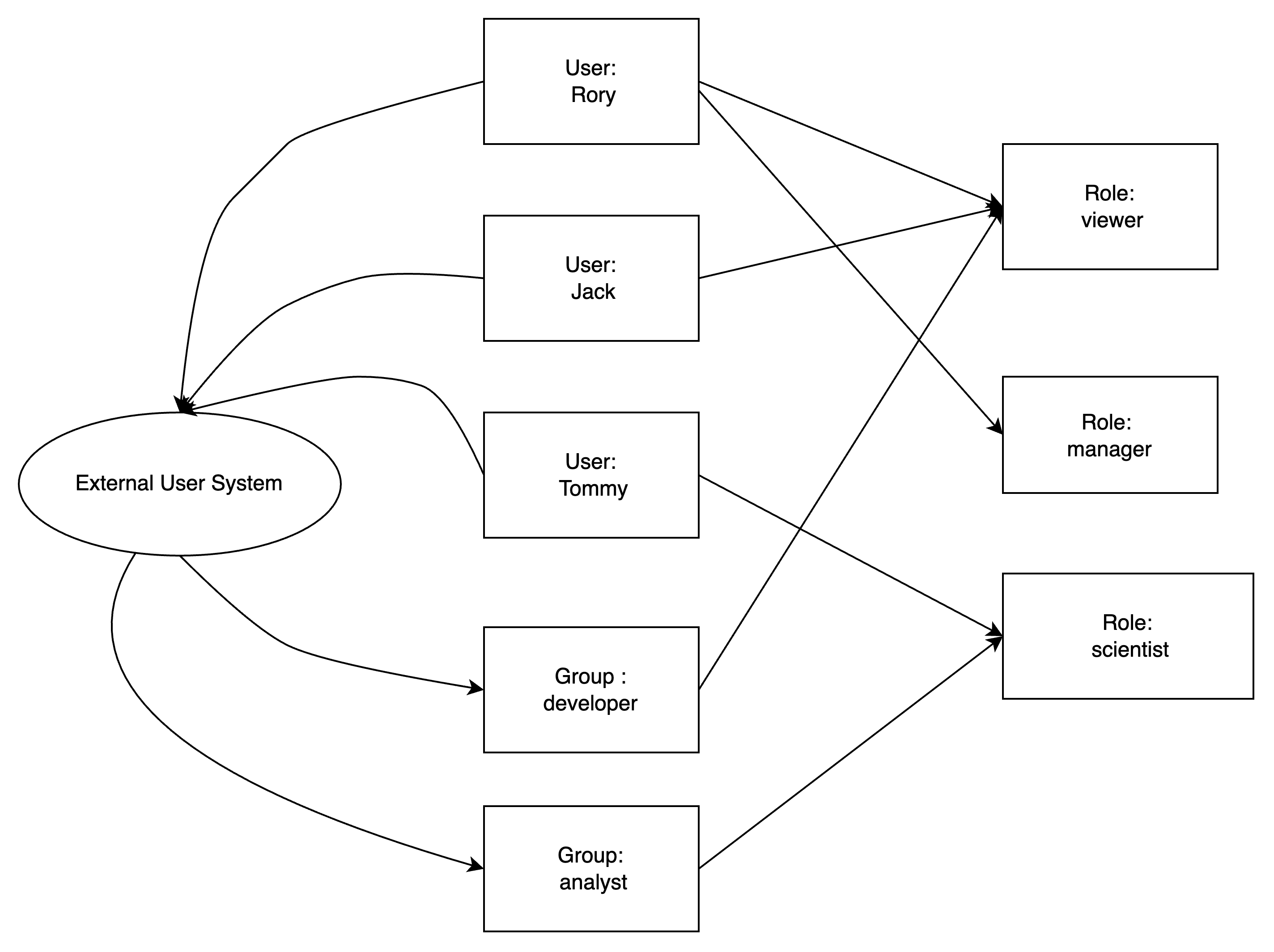
A user represents an individual identity in Gravitino. Users can be:
- Granted one or more roles
- Given different operating privileges based on their assigned roles
- Made owners of securable objects
Group
A group is a collection of users that simplifies permission management by allowing you to:
- Grant permissions to multiple users at once
- Manage access control for teams or departments
- Assign roles that all group members will inherit
All users in a group inherit the roles and privileges granted to that group.
Groups can be granted roles and privileges, but they cannot be owners of securable objects. Only users can be owners.
Metadata Objects
Metadata objects are entities managed by Gravitino, such as catalogs, schemas, tables, filesets, topics, roles, and metalakes.
Naming Convention:
- Each metadata object has a type and a name
- Names use dot notation to represent hierarchy
Examples:
METALAKE: "metalake1"CATALOG: "catalog1" (under a metalake)SCHEMA: "catalog1.schema1" (under a catalog)TABLE: "catalog1.schema1.table1" (under a schema)
Securable Objects
A securable object is any metadata object to which access can be granted. The default policy is deny-by-default: unless explicitly granted, access is denied.
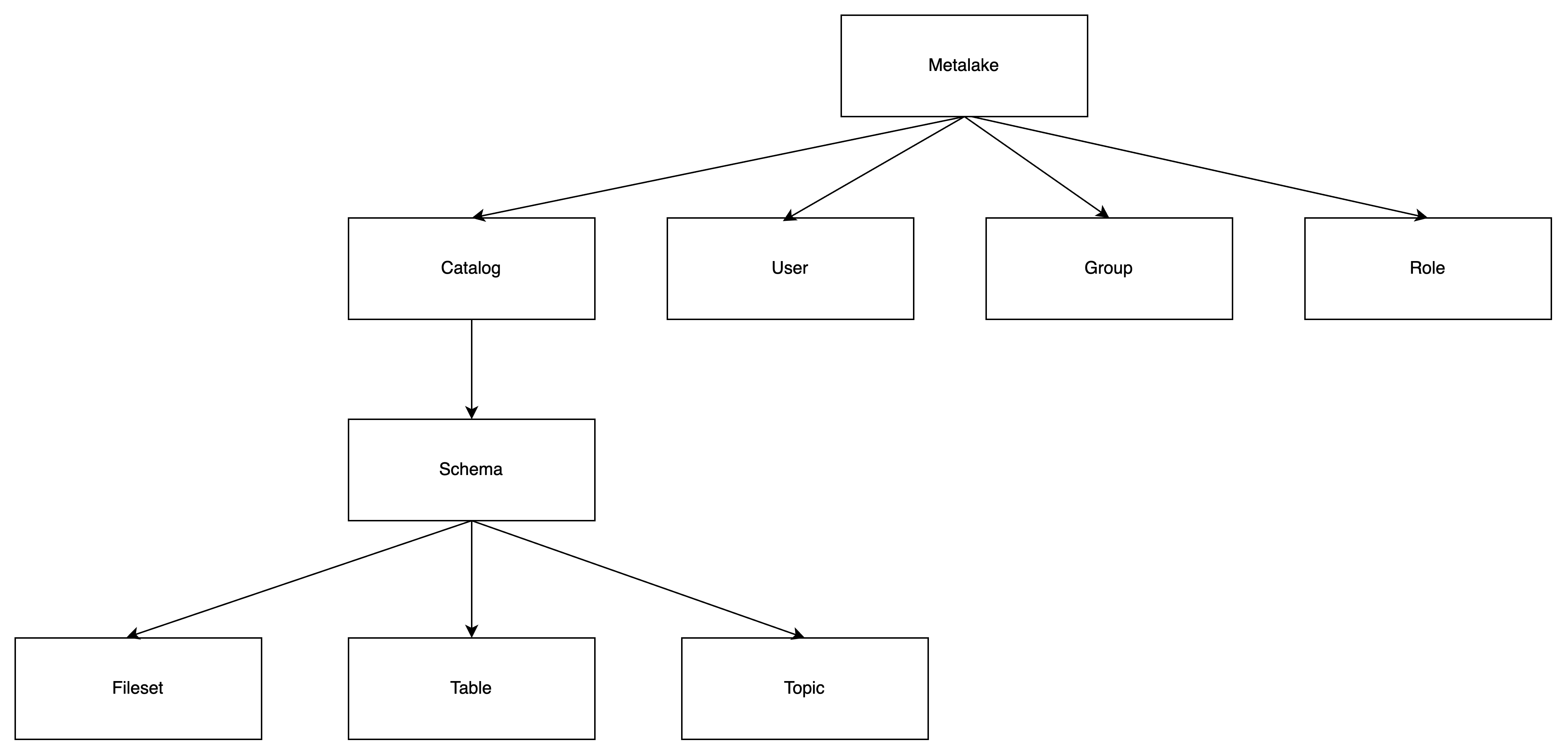
Hierarchy:
Securable objects exist in a hierarchical container structure:
Metalake (top level)
└── Catalog (represents a data source)
    └── Schema
        ├── Table
        ├── Topic
        └── Fileset
Relationships:
The following diagrams illustrate the relationships between users, groups, roles, and securable objects:
Role Types
Service Admin
Service administrators are responsible for creating metalakes. This role is typically assigned to system maintainers or operators who bootstrap the initial metadata organization.
Privileges:
- Create metalakes
Ownership:
- When a service admin creates a metalake, they automatically become the owner of that metalake
- As the owner, they have full control over the metalake, including the ability to drop it
- Ownership can be transferred to another user if needed
Limitations:
- Cannot configure system-wide settings (handled through server configuration files)
- Cannot manage service-level permissions
Service admins automatically become the owner of metalakes they create. However, ownership can be changed by setting a new owner for the metalake.
Custom Roles
You can create custom roles tailored to your business needs using the API or client libraries. Custom roles allow you to:
- Define specific permission sets
- Align access control with your organization's structure
- Implement least-privilege access policies
Privilege Types
Gravitino provides a comprehensive set of privileges organized by the type of operation and securable object. The following sections detail all available privileges.
User privileges
| Name | Supports Securable Object | Operation |
|---|---|---|
| MANAGE_USERS | Metalake | Add or remove users |
Group privileges
| Name | Supports Securable Object | Operation |
|---|---|---|
| MANAGE_GROUPS | Metalake | Add or remove groups |
Role privileges
| Name | Supports Securable Object | Operation |
|---|---|---|
| CREATE_ROLE | Metalake | Create a role |
Permission privileges
| Name | Supports Securable Object | Operation |
|---|---|---|
| MANAGE_GRANTS | Metalake | Manages roles granted to or revoked from the user or group, and privilege granted to or revoked from the role |
Catalog privileges
| Name | Supports Securable Object | Operation |
|---|---|---|
| CREATE_CATALOG | Metalake | Create a catalog |
| USE_CATALOG | Metalake, Catalog | Use a catalog |
USE_CATALOG is needed for a user to interact with any object within the catalog.
For example, to select data from a table, users need to have the SELECT_TABLE privilege on that table and
USE_CATALOG privileges on its parent catalog as well as USE_SCHEMA privileges on its parent schema.
Schema privileges
| Name | Supports Securable Object | Operation |
|---|---|---|
| CREATE_SCHEMA | Metalake, Catalog | Create a schema |
| USE_SCHEMA | Metalake, Catalog, Schema | Use a schema |
USE_SCHEMAis needed for a user to interact with any object within the schema.
For example, to select data from a table, users need to have the SELECT_TABLE privilege on that table
and USE_SCHEMA privileges on its parent schema.
Table privileges
| Name | Supports Securable Object | Operation |
|---|---|---|
| CREATE_TABLE | Metalake, Catalog, Schema | Create a table |
| MODIFY_TABLE | Metalake, Catalog, Schema, Table | Select data from a data, write data to a table or modify the table schema |
| SELECT_TABLE | Metalake, Catalog, Schema, Table | Select data from a table |
DENY MODIFY_TABLE won't deny the SELECT_TABLE operation if the user has the privilege to ALLOW SELECT_TABLE on the table.
DENY SELECT_TABLE won‘t deny the MODIFY_TABLE operation if the user has the privilege ALLOW MODIFY_TABLE on the table.
Topic privileges
| Name | Supports Securable Object | Operation |
|---|---|---|
| CREATE_TOPIC | Metalake, Catalog, Schema | Create a topic |
| PRODUCE_TOPIC | Metalake, Catalog, Schema, Topic | Consume and produce a topic (including alter a topic) |
| CONSUME_TOPIC | Metalake, Catalog, Schema, Topic | Consume a topic |
DENY PRODUCE_TOPIC won't deny the COMSUME_TOPIC operation if the user has the privilege to ALLOW CONSUME_TOPIC on the topic.
DENY CONSUME_TOPIC won‘t deny the PRODUCE_TOPIC operation if the user has the privilege ALLOW PRODUCE_TOPIC on the topic.
Fileset privileges
| Name | Supports Securable Object | Operation |
|---|---|---|
| CREATE_FILESET | Metalake, Catalog, Schema | Create a fileset |
| WRITE_FILESET | Metalake, Catalog, Schema, Fileset | Read and write a fileset (including alter a fileset) |
| READ_FILESET | Metalake, Catalog, Schema, Fileset | Read a fileset |
DENY READ_FILESET won't deny the WRITE_FILESET operation if the user has the privilege to ALLOW WRITE_FILESET on the fileset.
DENY WRITE_FILESET won‘t deny the READ_FILESET operation if the user has the privilege ALLOW READ_FILESET on the fileset.
Model privileges
The privileges CREATE_MODEL and CREATE_MODEL_VERSION are deprecated and will be removed in a future release. Please use REGISTER_MODEL and LINK_MODEL_VERSION instead. The deprecated privileges still work for backward compatibility.
| Name | Supports Securable Object | Operation |
|---|---|---|
| REGISTER_MODEL | Metalake, Catalog, Schema | Register a model |
| LINK_MODEL_VERSION | Metalake, Catalog, Schema, Model | Link a model version |
| USE_MODEL | Metalake, Catalog, Schema, Model | View the metadata of the model and download all the model versions |
| CREATE_MODEL | Metalake, Catalog, Schema | Register a model, this is deprecated. Please use REGISTER_MODEL instead. |
| CREATE_MODEL_VERSION | Metalake, Catalog, Schema, Model | Link a model version, this is deprecated. Please use LINK_MODEL_VERSION instead. |
Tag privileges
| Name | Supports Securable Object | Operation |
|---|---|---|
| CREATE_TAG | Metalake | Create a tag |
| APPLY_TAG | Metalake, Tag | Associate tags with metadata objects. |
Policy privileges
| Name | Supports Securable Object | Operation |
|---|---|---|
| CREATE_POLICY | Metalake | Create a policy |
| APPLY_POLICY | Metalake, Policy | Associate policies with metadata objects. |
Job template privileges
| Name | Supports Securable Object | Operation |
|---|---|---|
| REGISTER_JOB_TEMPLATE | Metalake | Register a job template |
| USE_JOB_TEMPLATE | Metalake, JobTemplate | Use a job template when running the job |
Job privileges
| Name | Supports Securable Object | Operation |
|---|---|---|
| RUN_JOB | Metalake | Run a job |
Privilege Inheritance
Gravitino implements hierarchical privilege inheritance, where privileges granted at higher levels automatically apply to all objects at lower levels.
How It Works:
- Granting a privilege on a metalake applies it to all catalogs, schemas, and objects within that metalake
- Granting a privilege on a catalog applies it to all schemas and objects within that catalog
- Granting a privilege on a schema applies it to all tables, topics, and filesets within that schema
Example:
If you grant a user SELECT_TABLE privilege on a catalog:
- The user can read all tables in that catalog
- This includes tables in all schemas within the catalog
- The privilege applies to both existing and future tables
This inheritance model simplifies permission management for large datasets while maintaining fine-grained control when needed.
Privilege Conditions
Each privilege can have one of two conditions:
ALLOW: Grants permission to perform the operationDENY: Explicitly denies permission to perform the operation
Priority Rules
DENY takes precedence over ALLOW:
- If a user has both
ALLOWandDENYfor the same privilege, the operation is denied - This applies regardless of whether the conditions come from different roles
Inheritance and Conditions
Privilege conditions do not override parent object conditions. Both parent and child conditions are evaluated:
Example 1: Parent ALLOW, Child DENY
- Metalake:
USE_CATALOG→ ALLOW - Catalog:
USE_CATALOG→ DENY - Result: User cannot use the catalog (DENY wins)
Example 2: Parent DENY, Child ALLOW
- Metalake:
USE_CATALOG→ DENY - Catalog:
USE_CATALOG→ ALLOW - Result: User cannot use the catalog (DENY wins)
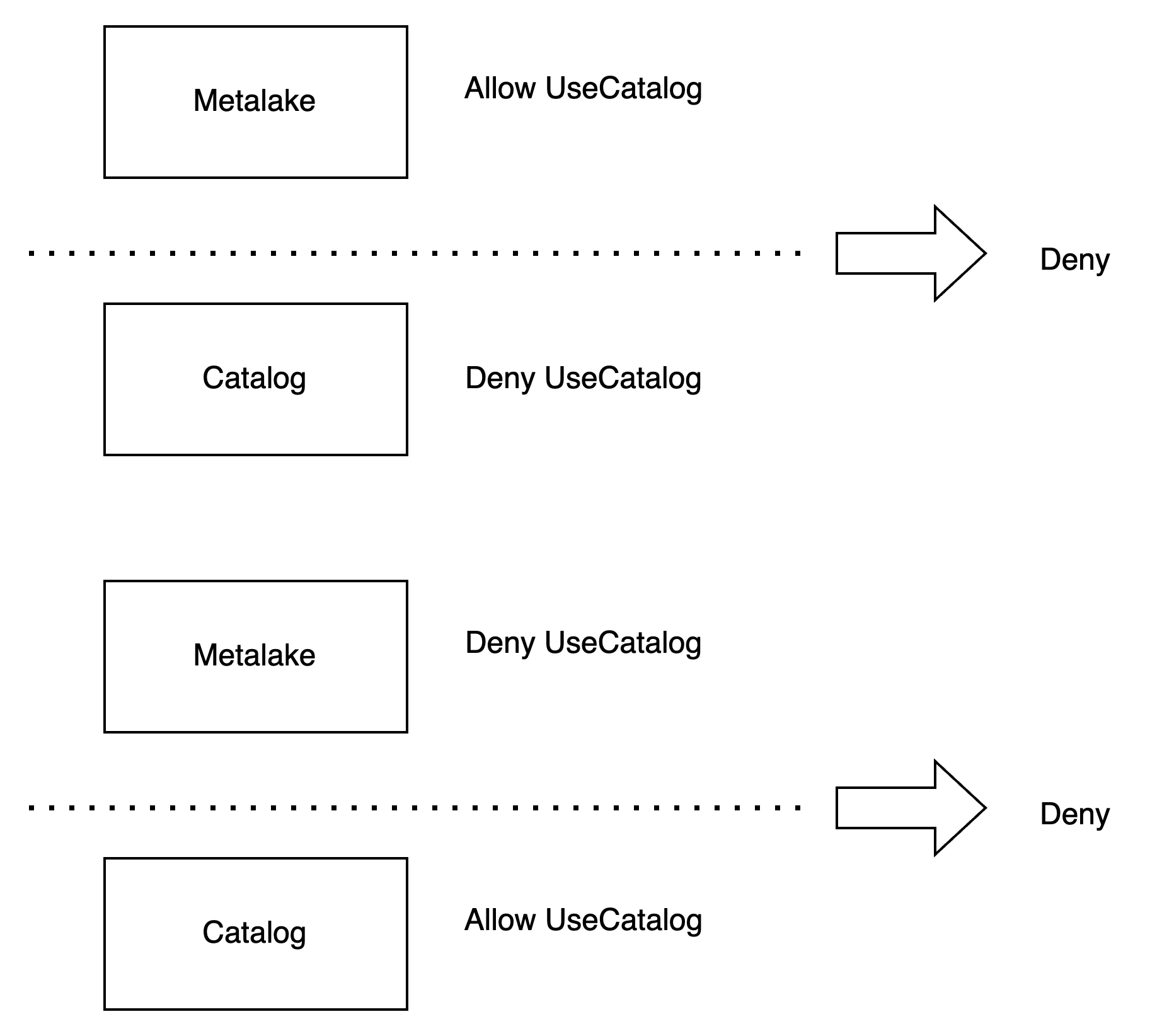
This model ensures that denials cannot be circumvented by grants at lower levels in the hierarchy.
Configuration
To enable access control in Gravitino, configure the following settings in your server configuration file:
| Configuration Item | Description | Default Value | Required | Since Version |
|---|---|---|---|---|
gravitino.authorization.enable | Enable or disable authorization in Gravitino | false | No | 0.5.0 |
gravitino.authorization.serviceAdmins | Comma-separated list of service administrator usernames | (none) | Yes (when authorization is enabled) | 0.5.0 |
Important Notes
Authorization Requirements:
- Add users first: Users must be added to a metalake before creating metadata objects
- Default user: If no user is specified, operations use the
anonymoususer - Automatic membership: When creating a metalake with authorization enabled, the creator is automatically added to that metalake
Example Configuration:
# Enable authorization
gravitino.authorization.enable = true

# Define service administrators
gravitino.authorization.serviceAdmins = admin1,admin2
Operations
The following sections demonstrate how to perform common access control operations using both the REST API (Shell) and Java client.
User Operations
Add a user
Add a user to your metalake before using authorization features.
- Shell
- Java
curl -X POST -H "Accept: application/vnd.gravitino.v1+json" \
-H "Content-Type: application/json" -d '{
  "name": "user1"
}' http://localhost:8090/api/metalakes/test/users
GravitinoClient client = ...
User user =
    client.addUser("user1");
List users
List all users in a metalake. Use details=true to get full user objects instead of just names.
- Shell
- Java
curl -X GET -H "Accept: application/vnd.gravitino.v1+json" \
-H "Content-Type: application/json" http://localhost:8090/api/metalakes/test/users/

curl -X GET -H "Accept: application/vnd.gravitino.v1+json" \
-H "Content-Type: application/json" http://localhost:8090/api/metalakes/test/users/?details=true
GravitinoClient client = ...
String[] usernames = client.listUserNames();

User[] users = client.listUsers();
Get a user
You can get a user by its name.
- Shell
- Java
curl -X GET -H "Accept: application/vnd.gravitino.v1+json" \
-H "Content-Type: application/json" http://localhost:8090/api/metalakes/test/users/user1
GravitinoClient client = ...
User user =
    client.getUser("user1");
Remove a user
You can remove a user by its name.
- Shell
- Java
curl -X DELETE -H "Accept: application/vnd.gravitino.v1+json" \
-H "Content-Type: application/json" http://localhost:8090/api/metalakes/test/users/user1
GravitinoClient client = ...
boolean removed =
    client.removeUser("user1");
Group Operation
Add a Group
You should add the group to your metalake before you use the authorization.
- Shell
- Java
curl -X POST -H "Accept: application/vnd.gravitino.v1+json" \
-H "Content-Type: application/json" -d '{
  "name": "group1"
}' http://localhost:8090/api/metalakes/test/groups
GravitinoClient client = ...
Group group =
    client.addGroup("group1");
List groups
You can list the created groups in a metalake. Returns the list of groups if details is true, otherwise returns the list of group name.
- Shell
- Java
curl -X GET -H "Accept: application/vnd.gravitino.v1+json" \
-H "Content-Type: application/json" http://localhost:8090/api/metalakes/test/groups/

curl -X GET -H "Accept: application/vnd.gravitino.v1+json" \
-H "Content-Type: application/json" http://localhost:8090/api/metalakes/test/groups/?details=true
GravitinoClient client = ...
String[] usernames = client.listGroupNames();

User[] users = client.listGroups();
Get a group
You can get a group by its name.
- Shell
- Java
curl -X GET -H "Accept: application/vnd.gravitino.v1+json" \
-H "Content-Type: application/json" http://localhost:8090/api/metalakes/test/groups/group1
GravitinoClient client = ...
Group group =
    client.getGroup("group1");
Remove a group
You can remove a group by its name.
- Shell
- Java
curl -X DELETE -H "Accept: application/vnd.gravitino.v1+json" \
-H "Content-Type: application/json" http://localhost:8090/api/metalakes/test/groups/group1
GravitinoClient client = ...
boolean removed =
    client.removeGroup("group1");
Role Operation
Create a role
You can create a role by given properties.
- Shell
- Java
curl -X POST -H "Accept: application/vnd.gravitino.v1+json" \
-H "Content-Type: application/json" -d '{
   "name": "role1",
   "properties": {"k1": "v1"},
   "securableObjects": [
          {
             "fullName": "catalog1.schema1.table1",
             "type": "TABLE",
             "privileges": [
                    {
                         "name": "SELECT_TABLE",
                         "condition": "ALLOW"
                    }
             ]
          }
   ]
}' http://localhost:8090/api/metalakes/test/roles
GravitinoClient client = ...

SecurableObject securableObject =
    SecurableObjects.ofTable(
        SecurableObjects.ofSchema(
            SecurableObjects.ofCatalog("catalog1", Collections.emptyList()),
            "schema1",
            Collections.emptyList()),
        "table1",
        Lists.newArrayList(Privileges.SelectTable.allow()));

Role role =
    client.createRole("role1", ImmutableMap.of("k1", "v1"), Lists.newArrayList(securableObject));
List roles
You can list the created roles in a metalake.
- Shell
- Java
curl -X GET -H "Accept: application/vnd.gravitino.v1+json" \
-H "Content-Type: application/json" http://localhost:8090/api/metalakes/test/roles/
GravitinoClient client = ...
String[] usernames = client.listRoleNames();
List roles for the metadata object
You can list the binding roles for a metadata object in a metalake.
The request path for REST API is /api/metalakes/{metalake}/objects/{metadataObjectType}/{metadataObjectName}/roles.
- Shell
- Java
curl -X GET -H "Accept: application/vnd.gravitino.v1+json" \
http://localhost:8090/api/metalakes/test/objects/catalog/catalog1/roles

curl -X GET -H "Accept: application/vnd.gravitino.v1+json" \
http://localhost:8090/api/metalakes/test/objects/schema/catalog1.schema1/roles
Catalog catalog1 = ..
String[] roles = catalog1.supportsRoles().listBindingRoleNames();

Schema schema1 = ...
String[] roles = schema1.supportsRoles().listBindingRoleNames();
Get a role
You can get a role by its name.
- Shell
- Java
curl -X GET -H "Accept: application/vnd.gravitino.v1+json" \
-H "Content-Type: application/json"  http://localhost:8090/api/metalakes/test/roles/role1
GravitinoClient client = ...
Role role =
    client.getRole("role1");
Delete a role
You can delete a role by its name.
- Shell
- Java
curl -X DELETE -H "Accept: application/vnd.gravitino.v1+json" \
-H "Content-Type: application/json" http://localhost:8090/api/metalakes/test/roles/role1
GravitinoClient client = ...
boolean deleted =
    client.deleteRole("role1");
Permission Operation
Grant privileges to a role
You can grant specific privileges to a role.
The request path for REST API is /api/metalakes/{metalake}/permissions/roles/{role}/{metadataObjectType}/{metadataObjectName}/grant.
- Shell
- Java
curl -X PUT -H "Accept: application/vnd.gravitino.v1+json" \
-H "Content-Type: application/json" -d '{
    "privileges": [
      {
      "name": "SELECT_TABLE",
      "condition": "ALLOW"
      }]
}' http://localhost:8090/api/metalakes/test/permissions/roles/role1/schema/catalog1.schema1/grant

curl -X PUT -H "Accept: application/vnd.gravitino.v1+json" \
-H "Content-Type: application/json" -d '{
    "privileges": [
      {
      "name": "SELECT_TABLE",
      "condition": "ALLOW"
      }]
}' http://localhost:8090/api/metalakes/test/permissions/roles/role1/table/catalog1.schema1.table1/grant
GravitinoClient client = ...

// Grant the privilege allowing `SELEC_TABLE` for the `schema` to `role1`
MetadataObject schema = ...
Role role = client.grantPrivilegesToRole("role1", schema, Lists.newArrayList(Privileges.SelectTable.allow()));

// Grant the privilege allowing `SELEC_TABLE` for the `table` to `role1`
MetadataObject table = ...
Role role = client.grantPrivilegesToRole("role1", table, Lists.newArrayList(Privileges.SelectTable.allow()));
Revoke privileges from a role
You can revoke specific privileges from a role.
The request path for REST API is /api/metalakes/{metalake}/permissions/roles/{role}/{metadataObjectType}/{metadataObjectName}/revoke.
- Shell
- Java
curl -X PUT -H "Accept: application/vnd.gravitino.v1+json" \
-H "Content-Type: application/json" -d '{
    "privileges": [
      {
      "name": "SELECT_TABLE",
      "condition": "ALLOW"
      }]
}' http://localhost:8090/api/metalakes/test/permissions/roles/role1/schema/catalog1.schema1/revoke

curl -X PUT -H "Accept: application/vnd.gravitino.v1+json" \
-H "Content-Type: application/json" -d '{
    "privileges": [
      {
      "name": "SELECT_TABLE",
      "condition": "ALLOW"
      }]
}' http://localhost:8090/api/metalakes/test/permissions/roles/role1/table/catalog1.schema1.table1/revoke
GravitinoClient client = ...

// Revoke the privilege allowing `SELEC_TABLE` for the `schema` from `role1`
MetadataObject schema = ...
Role role = client.revokePrivilegesFromRole("role1", schema, Lists.newArrayList(Privileges.SelectTable.allow()));

// Revoke the privilege allowing `SELEC_TABLE` for the `table` from `role1`
MetadataObject table = ...
Role role = client.revokePrivilegesFromRole("role1", table, Lists.newArrayList(Privileges.SelectTable.allow()));
Grant roles to a user
You can grant specific roles to a user.
- Shell
- Java
curl -X PUT -H "Accept: application/vnd.gravitino.v1+json" \
-H "Content-Type: application/json" -d '{
    "roleNames": ["role1"]
}' http://localhost:8090/api/metalakes/test/permissions/users/user1/grant
GravitinoClient client = ...
User user = client.grantRolesToUser(Lists.newList("role1"), "user1");
Revoke roles from a user
You can revoke specific roles from a user.
- Shell
- Java
curl -X PUT -H "Accept: application/vnd.gravitino.v1+json" \
-H "Content-Type: application/json" -d '{
    "roleNames": ["role1"]
}' http://localhost:8090/api/metalakes/test/permissions/users/user1/revoke
GravitinoClient client = ...
User user = client.revokeRolesFromUser(Lists.newList("role1"), "user1");
Grant roles to a group
You can grant specific roles to a group.
- Shell
- Java
curl -X PUT -H "Accept: application/vnd.gravitino.v1+json" \
-H "Content-Type: application/json" -d '{
    "roleNames": ["role1"]
}' http://localhost:8090/api/metalakes/test/permissions/groups/group1/grant
GravitinoClient client = ...
Group group = client.grantRolesToGroup(Lists.newList("role1"), "group1");
Revoke roles from a group
You can revoke specific roles from a group.
- Shell
- Java
curl -X PUT -H "Accept: application/vnd.gravitino.v1+json" \
-H "Content-Type: application/json" -d '{
    "roleNames": ["role1"]
}' http://localhost:8090/api/metalakes/test/permissions/groups/group1/revoke
GravitinoClient client = ...
Group group = client.revokeRolesFromGroup(Lists.newList("role1"), "group1");
Ownership Operation
get the owner
You can get the owner of a metadata object.
- Shell
- Java
curl -X GET -H "Accept: application/vnd.gravitino.v1+json" \
-H "Content-Type: application/json" http://localhost:8090/api/metalakes/test/owners/table/catalog1.schema1.table1
GravitinoClient client = ...

MetadataObject table =
        MetadataObjects.of(Lists.newArrayList("catalog1", "schema1", "table1"), MetadataObject.Type.TABLE);

Owner owner = client.getOwner(table);
set the owner
You can set the owner of a metadata object.
- Shell
- Java
curl -X PUT -H "Accept: application/vnd.gravitino.v1+json" \
-H "Content-Type: application/json" -d '{
    "name": "user1",
    "type": "USER"
}' http://localhost:8090/api/metalakes/test/owners/table/catalog1.schema1.table1
GravitinoClient client = ...

MetadataObject table =
        MetadataObjects.of(Lists.newArrayList("catalog1", "schema1", "table1"), MetadataObject.Type.TABLE);

client.setOwner(table, "user1", "USER");
Example
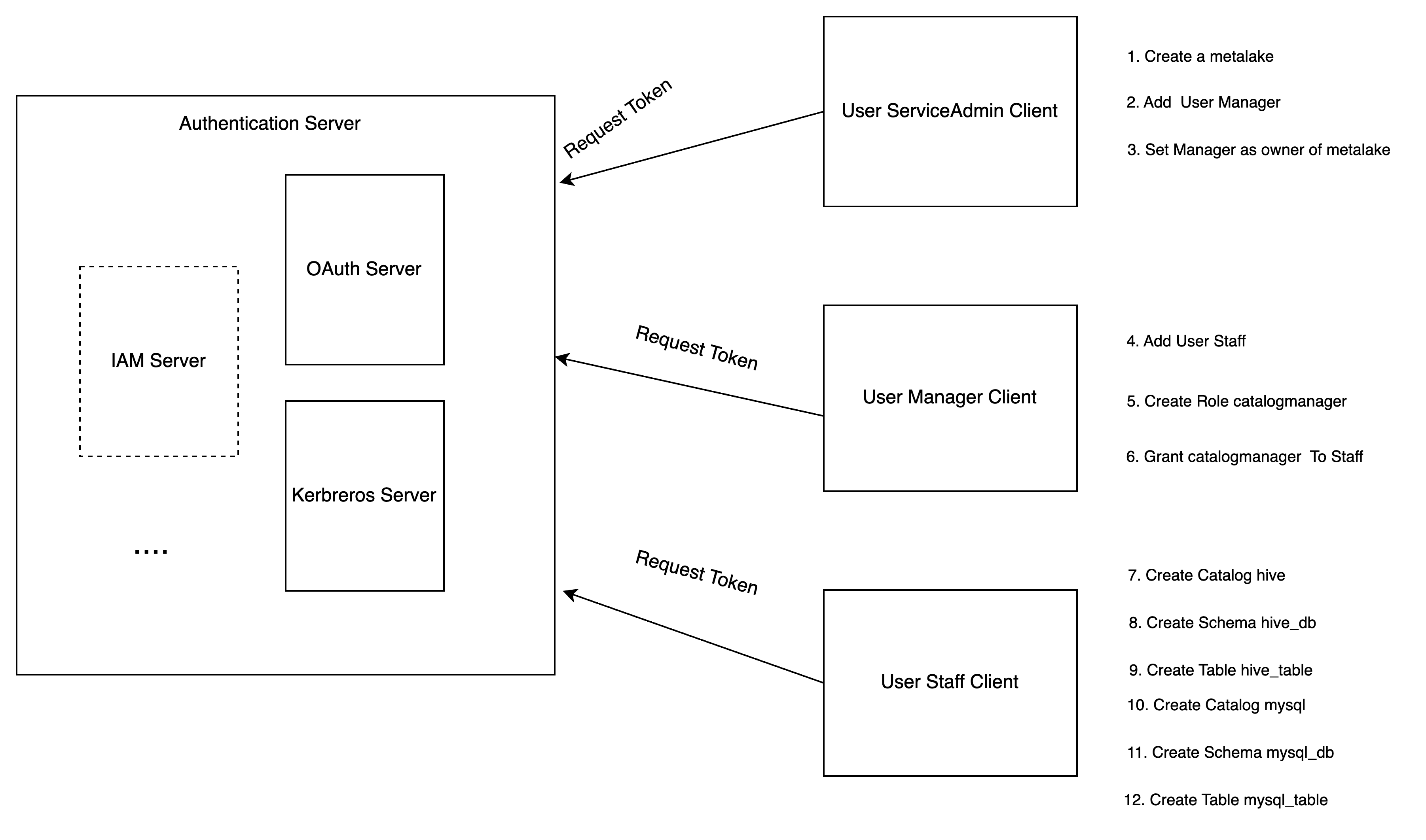
You can follow the steps to achieve the authorization of Gravitino.
-
Service admin configures the Gravitino server to enable authorization and creates a metalake.
-
Service admin adds the user
Managerto the metalake. -
Service admin sets the
Manageras the owner of the metalake. -
Manageradds the userStaff. -
Managercreates a specific rolecatalog_managerwithCREATE_CATALOGprivilege. -
Managergrants the rolecatalog_managerto the userStaff. -
Staffcreates a Hive type catalog. -
Staffcreates a schemahive_dbfor Hive catalog. -
Staffcreates a tablehive_tableunder the schemahive_db. -
Staffcreates a MySQL type catalog. -
Staffcreates a schemamysql_dbfor MySQL catalog. -
Staffcreates a tablemysql_tableunder the schemamysql_db. -
Staffcan use Gravitino connector to query the tables from different catalogs.
API required conditions
The following table lists the required privileges for each API.
| API | Required Conditions(s) |
|---|---|
| create metalake | The user must be the service admins, configured in the server configurations. |
| load metalake | The user is in the metalake |
| alter metalake | The owner of the metalake |
| drop metalake | The owner of the metalake |
| create catalog | CREATE_CATALOG on the metalake or the owner of the metalake |
| alter catalog | The owner of the catalog, metalake |
| drop catalog | The owner of the catalog, metalake |
| list catalog | The owner of the metalake can see all the catalogs, others can see the catalogs which they can load |
| load catalog | The one of owners of the metalake, catalog or have USE_CATALOG on the metalake,catalog |
| create schema | CREATE_SCHEMA and USE_CATALOG on the metalake, catalog or the owner of the metalake, catalog. |
| alter schema | First, you should have the privilege to load the catalog. Then, you are one of the owners of the schema, catalog, metalake |
| drop schema | First, you should have the privilege to load the catalog. Then, you are one of the owners of the schema, catalog, metalake |
| list schema | First, you should have the privilege to load the catalog. Then, the owner of the metalake, catalog can see all the schemas, others can see the schemas which they can load. |
| load schema | First, you should have the privilege to load the catalog. Then, you are the owner of the metalake, catalog, schema or have USE_SCHEMA on the metalake, catalog, schema. |
| create table | First, you should have the privilege to load the catalog and the schema. CREATE_TABLE on the metalake, catalog, schema or the owner of the metalake, catalog, schema |
| alter table | First, you should have the privilege to load the catalog and the schema. Then, you are one of the owners of the table, schema,catalog, metalake or have MODIFY_TABLE on the table, schema, catalog, metalake |
| update table statistics | First, you should have the privilege to load the catalog and the schema. Then, you are one of the owners of the table, schema,catalog, metalake or have MODIFY_TABLE on the table, schema, catalog, metalake |
| drop table statistics | First, you should have the privilege to load the catalog and the schema. Then, you are one of the owners of the table, schema,catalog, metalake or have MODIFY_TABLE on the table, schema, catalog, metalake |
| update table partition statistics | First, you should have the privilege to load the catalog and the schema. Then, you are one of the owners of the table, schema,catalog, metalake or have MODIFY_TABLE on the table, schema, catalog, metalake |
| drop table partition statistics | First, you should have the privilege to load the catalog and the schema. Then, you are one of the owners of the table, schema,catalog, metalake or have MODIFY_TABLE on the table, schema, catalog, metalake |
| drop table | First, you should have the privilege to load the catalog and the schema. Then, you are one of the owners of the table, schema, catalog, metalake |
| list table | First, you should have the privilege to load the catalog and the schema. Then, the owner of the schema, catalog, metalake can see all the tables, others can see the tables which they can load |
| load table | First, you should have the privilege to load the catalog and the schema. Then, you are one of the owners of the table, schema, metalake, catalog or have either SELECT_TABLE or MODIFY_TABLE on the table, schema, catalog, metalake |
| list table statistics | First, you should have the privilege to load the catalog and the schema. Then, you are one of the owners of the table, schema, metalake, catalog or have either SELECT_TABLE or MODIFY_TABLE on the table, schema, catalog, metalake |
| list table partition statistics | First, you should have the privilege to load the catalog and the schema. Then, you are one of the owners of the table, schema, metalake, catalog or have either SELECT_TABLE or MODIFY_TABLE on the table, schema, catalog, metalake |
| create topic | First, you should have the privilege to load the catalog and the schema. Then, you have CREATE_TOPIC on the metalake, catalog, schema or are the owner of the metalake, catalog, schema |
| alter topic | First, you should have the privilege to load the catalog and the schema. Then, you are one of the owners of the topic, schema,catalog, metalake or have PRODUCE_TOPIC on the topic, schema, catalog, metalake |
| drop topic | First, you should have the privilege to load the catalog and the schema. Then, you are one of the owners of the topic, schema, catalog, metalake |
| list topic | First, you should have the privilege to load the catalog and the schema. Then, the owner of the schema, catalog, metalake can see all the topics, others can see the topics which they can load |
| load topic | First, you should have the privilege to load the catalog and the schema. Then, you are one of the owners of the topic, schema, metalake, catalog or have either CONSUME_TOPIC or PRODUCE_TOPIC on the topic, schema, catalog, metalake |
| create fileset | First, you should have the privilege to load the catalog and the schema. Then, you haveCREATE_FILESET on the metalake, catalog, schema or are the owner of the metalake, catalog, schema |
| alter fileset | First, you should have the privilege to load the catalog and the schema. Then, you are one of the owners of the fileset, schema,catalog, metalake or WRITE_FILESET on the fileset, schema, catalog, metalake |
| drop fileset | First, you should have the privilege to load the catalog and the schema. Then, you are one of the owners of the fileset, schema, catalog, metalake |
| list fileset | First, you should have the privilege to load the catalog and the schema. Then, you are one of the owners of the schema, catalog, metalake can see all the filesets, others can see the filesets which they can load |
| load fileset | First, you should have the privilege to load the catalog and the schema. Then, you are one of the owners of the fileset, schema, metalake, catalog or have either READ_FILESET or WRITE_FILESET on the fileset, schema, catalog, metalake |
| list fileset | First, you should have the privilege to load the catalog and the schema. Then, you are one of the owners of the fileset, schema, metalake, catalog or have either READ_FILESET or WRITE_FILESET on the fileset, schema, catalog, metalake |
| register model | First, you should have the privilege to load the catalog and the schema. Then, you have REGISTER_MODEL on the metalake, catalog, schema or are the owner of the metalake, catalog, schema |
| link model version | First, you should have the privilege to load the catalog, the schema and the model. Then, you have LINK_MODEL_VERSION on the metalake, catalog, schema, model or are the owner of the metalake, catalog, schema, model |
| alter model | First, you should have the privilege to load the catalog and the schema. Then, you are one of the owners of the model, schema, catalog, metalake |
| drop model | First, you should have the privilege to load the catalog and the schema. Then, you are one of the owners of the model, schema, catalog, metalake |
| list model | First, you should have the privilege to load the catalog and the schema. Then the owner of the schema, catalog, metalake can see all the models, others can see the models which they can load |
| load model | First, you should have the privilege to load the catalog and the schema. Then, you are one of the owners of the model, schema, metalake, catalog or have `USE_MODEL on the model, schema, catalog, metalake |
| list model version | First, you should have the privilege to load the catalog and the schema. Then, you are one of the owners of the model, schema, catalog, metalake or have `USE_MODEL on the model, schema, catalog, metalake |
| load model version | First, you should have the privilege to load the catalog and the schema. Then, you are one of the owners of the model, schema, metalake, catalog or have `USE_MODEL on the model, schema, catalog, metalake |
| load model version by alias | First, you should have the privilege to load the catalog and the schema. Then, you are one of the owners of the model, schema, metalake, catalog or have `USE_MODEL on the model, schema, catalog, metalake |
| delete model version | First, you should have the privilege to load the catalog and the schema. Then, you are one of the owners of the model, schema, metalake, catalog. |
| alter model version | First, you should have the privilege to load the catalog and the schema. Then, you are one of the owners of the model, schema, metalake, catalog. |
| delete model version alias | First, you should have the privilege to load the catalog and the schema. Then, you are one of the owners of the model, schema, metalake, catalog. |
| add user | MANAGE_USERS on the metalake or the owner of the metalake |
| remove user | MANAGE_USERS on the metalake or the owner of the metalake |
| get user | MANAGE_USERS on the metalake or the owner of the metalake or himself |
| list users | MANAGE_USERS on the metalake or the owner of the metalake can see all the users, others can see himself |
| add group | MANAGE_GROUPS on the metalake or the owner of the metalake |
| remove group | MANAGE_GROUPS on the metalake or the owner of the metalake |
| get group | MANAGE_GROUPS on the metalake or the owner of the metalake or his groups |
| list groups | MANAGE_GROUPS on the metalake or the owner of the metalake can see all the groups, others can see his group |
| create role | CREATE_ROLE on the metalake or the owner of the metalake |
| delete role | The owner of the metalake or the role |
| get role | MANAGE_GRANTS on the metalake or the owner of the metalake or the role. others can see his granted or owned roles. |
| list roles | MANAGE_GRANTS on the metalake or the owner of the metalake can see all the roles. Others can see his granted roles or owned roles. |
| grant role | MANAGE_GRANTS on the metalake |
| revoke role | MANAGE_GRANTS on the metalake |
| grant privilege | MANAGE_GRANTS on the metalake or the owner of the securable object |
| revoke privilege | MANAGE_GRANTS on the metalake or the owner of the securable object |
| set owner | The owner of the securable object |
| list tags | The owner of the metalake can see all the tags, others can see the tags which they can load. |
| create tag | CREATE_TAG on the metalake or the owner of the metalake. |
| get tag | APPLY_TAG on the metalake or tag, the owner of the metalake or the tag. |
| alter tag | Must be the owner of the metalake or the tag. |
| delete tag | Must be the owner of the metalake or the tag. |
| list objects for tag | Requires both permission to get the tag and permission to load metadata objects. |
| list tags for object | Permission to both list tags Requires both permission to list tags and permission to load metadata objects. load metadata objects is required. |
| get tag for object | Requires both permission to get the tag and permission to load metadata objects. |
| associate object tags | Requires both APPLY_TAG permission and permission to load metadata objects. |
| list policies for object | The owner of the metalake can see all the policies, others can see the policies which they can load. |
| create policy | CREATE_POLICY on the metalake or the owner of the metalake. |
| get policy | APPLY_POLICY on the metalake or policy, the owner of the metalake or the policy. |
| alter policy | Must be the owner of the metalake or the policy. |
| set policy | Must be the owner of the metalake or the policy. |
| delete policy | Must be the owner of the metalake or the policy. |
| list objects for policy | Requires both permission to get the policy and permission to load metadata objects. |
| associate-object-policies | Requires both APPLY_POLICY permission and permission to load metadata objects. |
| list policies for object | Requires both permission to get the policy and permission to load metadata objects. |
| get policy for object | Requires both permission to get the policy and permission to load metadata objects. |
| list job templates | The owner of the metalake can see all the job templates, others can see the job templates which they can get. |
| register a job template | REGISTER_JOB_TEMPLATE on the metalake or the owner of the metalake. |
| get a job template | USE_JOB_TEMPLATE on the metalake or job template, the owner of the metalake or the job template. |
| delete a job template | The owner of the metalake or the job template. |
| alter a job template | The owner of the metalake or the job template. |
| list jobs | The owner of the metalake can see all the jobs, others can see the jobs which they can get. |
| run a job | The owner of the metalake , or have both RUN_JOB on the metalake and USE_JOB_TEMPLATE on the job template |
| get a job | The owner of the metalake or the job. |
| cancel a job | The owner of the metalake or the job. |
| get credential | If you can load the metadata object, you can get its credential. |